Cashbook - Expense Tracker v24.01

| Paid Application | Added Date: September 27 2014 |
| Requires Android: 2.2 and up | Developer: Frank Android Software |
| Size: 1.3M | Category: Finance |
| Version: 24.01 | Version history: Cashbook - Expense Tracker |
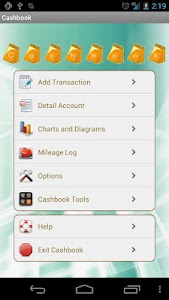
"Award: No.10 of "The 25 Best Android Apps for Business" by businesspundit.com "Cashbook is the Swiss Army Knife of Android finance-apps" by lifeofandroid.com For Business: a quick handy way to track expense/income/mileage/sales/receipts for tax/reimbursement/bookkeeping purposes. For Everyday life: track cash flow trend and balance from anywhere and at any time. For you this is your Cashbook. ---Feature list:--- • Real-time GPS mileage tracking for accurate distance and time • Timer only mode (without GPS) • Tap to start/stop/pause/resume GPS and timer • Recover unstopped GPS trip (even after device is powered off or app is killed). • Auto itinerary with GPS locations and addresses • Password protection • Select from 35 most used currencies • User-extendable Database: User can add delete rename income/expense categories payer/payee account and vehicle information. • Multiple accounts:User can create as many accounts as needed for multiple businesses or companies. • Import feature: For information about account vehicle payer payee income and expense categories user can import data from input CSV file to the database. • Duplicate income expense and mileage record. • Account details: Daily weekly monthly and yearly account details and summaries with six data type filters: ---Total ---Income only ---Expense only ---Type ---Income/expense Categories ---Payer/payee ---Account • Charts and diagrams: Weekly and monthly charts with six data type filters: ---Total ---Income only ---Expense only ---Type ---Income/expense Categories ---Payer/payee ---Account • Mileage Tracking: It is a perfect solution for tracking vehicle mileage for IRS/expense purpose. • Database back up to SD card Dropbox™ and Email. • Database restore from SD card or Dropbox™. • Local auto database backup • Online auto database backup • Share database with multiple devices by using Dropbox™ • Export/send report in CSV (for Microsoft Excel or Google Doc) QIF (for Quicken) or HTML (for web browser) format. • Report file can also be sent to Dropbox™ and Google™ Docs if the apps for them are installed. • Report filters: For report user has seven options to specify the date range: 1. All Date 2. Within Start and End Date 3. After Specific Date 4. After Last Export Date 5. Today 6. This Month 7. This Year • Auto update check • Optional auto tips on how to use Cashbook • Optional Splash Screen • Receipt snapshot feature: Take/Select/View/Email/Delete receipt snapshot • Sort by tap on column headers. • Support 4 popular date formats. • Support both 12 and 24 hour time formats. • Tip calculator • Math calculator • More... ---System requirements:--- -OS: Android v2.1 or above. -Physical Resolution: 240x400(WQVGA400) 320x480(HVGA) 480x800(WVGA800) 480x854(WVGA854) 540x960 800x600 1024x600 1280x800 and higher resolutions -Perfect for Android smart phone and tablet ---Things you should know--- • App developer doesn"t participate in the purchase and download process if you have problems with credit card authorization charge double charge download failures we have no way to help you You'll need to check the Google technical help forum. • Update is always free Google controls charging and it WILL NOT charge for update. ---Contact us:--- Provided by Frank Android Software @ http://www.softMiMo.com. Feel free to contact us via email. We have excellent support record and no question will be ignored."
| Download APK From Server 01 | Download APK From Server 02 |
| Get it on Google Play | |

0 comments:
Post a Comment