Breaking News
Loading...
  • New Movies
  • Recent Games
  • Tech Review

Tab 1 Top Area

Tech News

Game Reviews

Recent Post

Showing posts with label Comics. Show all posts
Friday, May 29, 2015
Wednesday, May 27, 2015
Tuesday, March 24, 2015
Friday, January 2, 2015
Thursday, November 27, 2014
Tuesday, November 25, 2014
Monday, November 24, 2014
Sunday, September 14, 2014
Saturday, August 16, 2014
Wednesday, August 13, 2014
Saturday, January 18, 2014
Manga Rock - Best Manga Reader v1.8.0

Manga Rock - Best Manga Reader v1.8.0

Manga Rock - Best Manga Reader v1.8.0

Free Application Added Date: November 07 2014
Requires Android: 4.0 and upDeveloper: Not A Basement International
Size: 7.1MCategory: Comics
Version: 1.8.0Version history: Manga Rock - Best Manga Reader

Screenshot Manga Rock - Best Manga Reader v1.8.0

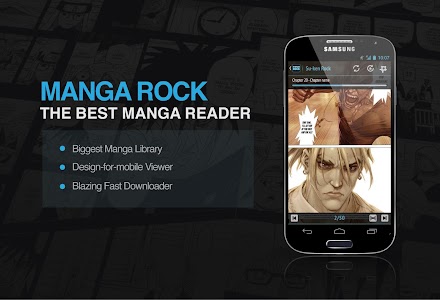
"★ Manga Rock leaves little to be desired. If you like manga then this is the application that will definitely please you in this regard -- Ghacks.net ★ All in all Manga Rock is one of the best manga reader apps that we’ve seen for Android -- Addictivetips.com Read & download over 100k manga from 20+ manga sources! IMPORTANT: ----------------------------------------------------- If you are an existing user of the old Manga Rock Android app please visit this blog post: http://bit.ly/17PkDDg. We will let you know how to migrate your data and restore your in-app purchase status in this new app. Otherwise please send us an email to [email protected] we"ll get back to you shortly. KEY FEATURES: ----------------------------------------------------- ✔ Fully localized in 7 languages. ✔ Access to the world’s biggest manga library with 100k manga from 20+ popular manga sources. More manga sources are added overtime. The full source list is available below. ✔ Best manga reading experience with Horizontal / Vertical reading modes (auto-switch based on device orientation) 2 reading directions Lock Zoom Brightness Control and Orientation Lock. Support immersive mode - in which all navigation toolbars are hidden to give extra reading spaces - inside manga viewer for Android 4.4. ✔ Find new manga to read with Discovery - which will recommend manga based on your reading preferences. ✔ Powerful search tool with genre filters to find any manga. ✔ Easily backup and restore Manga Rock data across multiple Android & iOS devices using your Facebook Twitter or email account. ✔ Support both Cover and List view in All Manga Latest Updates Favorites Recents and Downloaded screens for better more visual navigation. ✔ Fast manga downloader with multiple concurrent download and background download to save any manga for offline reading. You can save downloaded manga in SD card too. ✔ Auto-download new chapters of favorited manga and send out push-notifications to make sure that you never miss out any release. ✔ Handy Favorites & Recents lists to track your favorite manga’s releases or to jump back to the last read pages. ✔ Dozen of settings in “Personalize” to fully customize Manga Rock just the way you want. Join over 2 millions happy users on both Android and iOS platforms now! TECHNICAL REQUIREMENTS: ----------------------------------------------------- - Android OS: 4.0 ICS and above - Size: 5MB - Screen size: 480x800 and above CONTACT US: ----------------------------------------------------- - Website: www.mangarockapp.com - Blog: http://blog.notabasement.com/ - Google+: www.gplus.to/MangaRock - Facebook: www.facebook.com/mangarockapp MORE DETAILS ----------------------------------------------------- ✔ Languages & sources: - Available in English Spanish German French Italian Chinese and Vietnamese - Read manga from 22 popular sources: # English: Batoto (EN) MangaHere MangaReader MangaFox MangaEden (EN) # Arab: MangaAr # Italian: MangaEden (IT) Itascan Batoto (IT) # Vietnamese: VnSharing Manga24h Blogtruyen # German: MangaTube # Spanish: Submanga MangaHere (ES) Batoto (ES) # Chinese: manhua178 # French: AnimeStory Batoto (FR) # Russian: Readmanga MangaRussia # Portuguese: BPT ✔ Personalize Settings: - On/Off: Reduce data usage when reading & downloading manga - On/Off: Notification for new chapter of favorite manga - On/Off: Auto-download new chapter for favorite manga - On/Off: Smart Reading Mode - On/Off: Tap Back twice to exit viewer - On/Off: Auto-download next chapter for online reading - On/Off: Download manga with WiFi only - On/Off: Max number of connection when downloading with WiFi - Sort Favorites list by alphabetical order or by latest update - Choose your own startup screen as either All Manga Latest Updates Favorites Downloaded or Recents view. - Choose where to save downloaded manga: internal or external storage (SD card)"

Download APK From Server 01Download APK From Server 02
Get it on Google Play
Thursday, December 19, 2013
Manga Rock - Best Manga Reader v1.7.0

Manga Rock - Best Manga Reader v1.7.0

Manga Rock - Best Manga Reader v1.7.0

Free Application Added Date: October 10 2014
Requires Android: 4.0 and upDeveloper: Not A Basement International
Size: 7.1MCategory: Comics
Version: 1.7.0Version history: Manga Rock - Best Manga Reader

Screenshot Manga Rock - Best Manga Reader v1.7.0

"★ Manga Rock leaves little to be desired. If you like manga then this is the application that will definitely please you in this regard -- Ghacks.net ★ All in all Manga Rock is one of the best manga reader apps that we’ve seen for Android -- Addictivetips.com Read & download over 100k manga from 20+ manga sources! IMPORTANT: ----------------------------------------------------- If you are an existing user of the old Manga Rock Android app please visit this blog post: http://bit.ly/17PkDDg. We will let you know how to migrate your data and restore your in-app purchase status in this new app. Otherwise please send us an email to [email protected] we"ll get back to you shortly. KEY FEATURES: ----------------------------------------------------- ✔ Fully localized in 7 languages. ✔ Access to the world’s biggest manga library with 100k manga from 20+ popular manga sources. More manga sources are added overtime. The full source list is available below. ✔ Best manga reading experience with Horizontal / Vertical reading modes (auto-switch based on device orientation) 2 reading directions Lock Zoom Brightness Control and Orientation Lock. Support immersive mode - in which all navigation toolbars are hidden to give extra reading spaces - inside manga viewer for Android 4.4. ✔ Find new manga to read with Discovery - which will recommend manga based on your reading preferences. ✔ Powerful search tool with genre filters to find any manga. ✔ Easily backup and restore Manga Rock data across multiple Android & iOS devices using your Facebook Twitter or email account. ✔ Support both Cover and List view in All Manga Latest Updates Favorites Recents and Downloaded screens for better more visual navigation. ✔ Fast manga downloader with multiple concurrent download and background download to save any manga for offline reading. You can save downloaded manga in SD card too. ✔ Auto-download new chapters of favorited manga and send out push-notifications to make sure that you never miss out any release. ✔ Handy Favorites & Recents lists to track your favorite manga’s releases or to jump back to the last read pages. ✔ Dozen of settings in “Personalize” to fully customize Manga Rock just the way you want. Join over 2 millions happy users on both Android and iOS platforms now! TECHNICAL REQUIREMENTS: ----------------------------------------------------- - Android OS: 4.0 ICS and above - Size: 5MB - Screen size: 480x800 and above CONTACT US: ----------------------------------------------------- - Website: www.mangarockapp.com - Blog: http://blog.notabasement.com/ - Google+: www.gplus.to/MangaRock - Facebook: www.facebook.com/mangarockapp MORE DETAILS ----------------------------------------------------- ✔ Languages & sources: - Available in English Spanish German French Italian Chinese and Vietnamese - Read manga from 22 popular sources: # English: Batoto (EN) MangaHere MangaReader MangaFox MangaEden (EN) # Arab: MangaAr # Italian: MangaEden (IT) Itascan Batoto (IT) # Vietnamese: VnSharing Manga24h Blogtruyen # German: MangaTube # Spanish: Submanga MangaHere (ES) Batoto (ES) # Chinese: manhua178 # French: AnimeStory Batoto (FR) # Russian: Readmanga MangaRussia # Portuguese: BPT ✔ Personalize Settings: - On/Off: Reduce data usage when reading & downloading manga - On/Off: Notification for new chapter of favorite manga - On/Off: Auto-download new chapter for favorite manga - On/Off: Smart Reading Mode - On/Off: Tap Back twice to exit viewer - On/Off: Auto-download next chapter for online reading - On/Off: Download manga with WiFi only - On/Off: Max number of connection when downloading with WiFi - Sort Favorites list by alphabetical order or by latest update - Choose your own startup screen as either All Manga Latest Updates Favorites Downloaded or Recents view. - Choose where to save downloaded manga: internal or external storage (SD card)"

Download APK From Server 01Download APK From Server 02
Get it on Google Play
Saturday, October 26, 2013
CLZ Comics - Comic Database v1.1.6

CLZ Comics - Comic Database v1.1.6

CLZ Comics - Comic Database v1.1.6

Paid Application Added Date: September 04 2014
Requires Android: unknownDeveloper: Collectorz.com
Size: unknownCategory: Comics
Version: 1.1.6Version history: CLZ Comics - Comic Database

Screenshot CLZ Comics - Comic Database v1.1.6

"** Catalog your comic book collection on your Android device ** Auto-download cover art creators characters etc.. Just enter series titles or scan barcodes with your device camera. * Automatically add comics to your database Just enter series titles or scan comic barcodes with your device camera. CLZ Comics will automatically download full issue details including creator and character lists sollicitation texts / plot descriptions and cover images. * Catalog your comic collection & wish list Track the issues you own and the ones on your wish list. Organize and manage detailed issue information like Series Issue Nr Publisher Publication Date plus personal stuff like Purchase Information Condition Rating Notes and Tags. * Browse your comic database as an issue list or a cover "wall". View full issue information in the details panel. Group issues in Series or Publisher folders. Search your database with the Quick Search box. * Free CLZ Cloud storage of your collection data: Upload your collection data to the CLZ Cloud to have a full backup of your data. Sync your data between devices (e.g. desktop phone and tablet) through the CLZ Cloud."

Download APK From Server 01Download APK From Server 02
Get it on Google Play
Copyright © 2012 Android Stock APK All Right Reserved
Designed by CBTblogger