Breaking News
Loading...
  • New Movies
  • Recent Games
  • Tech Review

Tab 1 Top Area

Tech News

Game Reviews

Recent Post

Showing posts with label Homesoft. Show all posts
Saturday, November 22, 2014
Tuesday, November 18, 2014
Sunday, October 26, 2014
Tuesday, September 23, 2014
Friday, September 12, 2014
Wednesday, August 27, 2014
Sunday, August 24, 2014
Thursday, July 31, 2014
Saturday, June 21, 2014
Thursday, June 12, 2014
Tuesday, June 3, 2014
Thursday, May 8, 2014
Tuesday, February 11, 2014
Nexus Media Importer v8.0.6

Nexus Media Importer v8.0.6

Nexus Media Importer v8.0.6

Paid Application Added Date: November 25 2014
Requires Android: 4.0 and upDeveloper: Homesoft
Size: 1.7MCategory: Media & Video
Version: 8.0.6Version history: Nexus Media Importer

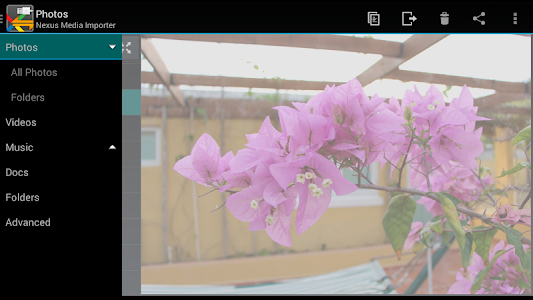
Screenshot Nexus Media Importer v8.0.6

"Nexus Media Importer allows you to stream and transfer music video photos and documents from a USB flash drive or card reader connected to your Nexus device (5 6 7G1 7G2 9 10) or other Android 4.0+ devices with USB Host support. Requires the following hardware: 1. An Android 4.0+ device. Please try the free "Nexus Photo Viewer" first if you do not have a Nexus device. Due to hardware limitations the Nexus 4 is not supported. 2. An USB OTG (On-The-Go) cable. Costs range from $1-10 USD see screenshots for examples. 3. An USB Flash Drive or USB Card Reader with a flash memory card inserted see screenshots for examples. Please see the FAQ on our website if you are trying to connect an external hard drive or other device. IMPORTANT: To use NMI offline you will have to activate the license by opening it online after installing. To use: -If you are using an card reader put the flash memory card in the reader first. -Attach your USB device to the OTG cable. -Attach the OTG cable to the Nexus or other device. -The application should launch automatically. -The File Manager tab can be used to manage and transfer files. -Use the Connect screen to determine the viewed device and the destination device for the Copy/Move operations. -The navigation menu to change between Photos Videos Document and the File Manager can be accessed by the three lines in the upper left hand corner. Support: -If you have an issue you can tap "Homesoft" from the About screen for e-mail support. -Currently most USB Mass Storage devices are supported. Due to the mind boggling number of USB devices available it is not 100% If you contact us we may be able to support your device in a future release. If you have doubts try the free "Nexus Photo Viewer" first. Technical Notes: -DOES NOT REQUIRE ROOT! Rooting may void your device"s warranty. -Hard Drives. It is strongly recommended that you use external power when connecting a hard drive to a tablet. Please see the troubleshooting guide on my web site for more information. Do not connect an unpowered hard drive to a phone! -This is a media streamer. Media types not natively supported by Android will require third party software. There are many excellent free and paid apps. in the Play market. For example: "BS Player" "MX Player" and "Dice Player" -The internal music player only plays formats natively supported by Android. WMA files are not supported but can be copied locally for use with another player. How-to Videos: -Connecting: http://www.youtube.com/watch?v=etrIpNHhWi0 -Photo: http://www.youtube.com/watch?v=3MSjqZWUIqI -Music: http://www.youtube.com/watch?v=Es7QyhkWjcI -General: http://www.youtube.com/watch?v=eCgvmvzqWAQ See the FAQ on the Developer"s Website link for an overview of the permissions. This software is not produced by Google which owns the Nexus trademark."

Download APK From Server 01Download APK From Server 02
Get it on Google Play
Saturday, February 8, 2014
Nexus Media Importer v8.0.5

Nexus Media Importer v8.0.5

Nexus Media Importer v8.0.5

Paid Application Added Date: November 23 2014
Requires Android: 4.0 and upDeveloper: Homesoft
Size: 1.7MCategory: Media & Video
Version: 8.0.5Version history: Nexus Media Importer

Screenshot Nexus Media Importer v8.0.5

"Nexus Media Importer allows you to stream and transfer music video photos and documents from a USB flash drive or card reader connected to your Nexus device (5 6 7G1 7G2 9 10) or other Android 4.0+ devices with USB Host support. Requires the following hardware: 1. An Android 4.0+ device. Please try the free "Nexus Photo Viewer" first if you do not have a Nexus device. Due to hardware limitations the Nexus 4 is not supported. 2. An USB OTG (On-The-Go) cable. Costs range from $1-10 USD see screenshots for examples. 3. An USB Flash Drive or USB Card Reader with a flash memory card inserted see screenshots for examples. Please see the FAQ on our website if you are trying to connect an external hard drive or other device. IMPORTANT: To use NMI offline you will have to activate the license by opening it online after installing. To use: -If you are using an card reader put the flash memory card in the reader first. -Attach your USB device to the OTG cable. -Attach the OTG cable to the Nexus or other device. -The application should launch automatically. -The File Manager tab can be used to manage and transfer files. -Use the Connect screen to determine the viewed device and the destination device for the Copy/Move operations. -The navigation menu to change between Photos Videos Document and the File Manager can be accessed by the three lines in the upper left hand corner. Support: -If you have an issue you can tap "Homesoft" from the About screen for e-mail support. -Currently most USB Mass Storage devices are supported. Due to the mind boggling number of USB devices available it is not 100% If you contact us we may be able to support your device in a future release. If you have doubts try the free "Nexus Photo Viewer" first. Technical Notes: -DOES NOT REQUIRE ROOT! Rooting may void your device"s warranty. -Hard Drives. It is strongly recommended that you use external power when connecting a hard drive to a tablet. Please see the troubleshooting guide on my web site for more information. Do not connect an unpowered hard drive to a phone! -This is a media streamer. Media types not natively supported by Android will require third party software. There are many excellent free and paid apps. in the Play market. For example: "BS Player" "MX Player" and "Dice Player" -The internal music player only plays formats natively supported by Android. WMA files are not supported but can be copied locally for use with another player. How-to Videos: -Connecting: http://www.youtube.com/watch?v=etrIpNHhWi0 -Photo: http://www.youtube.com/watch?v=3MSjqZWUIqI -Music: http://www.youtube.com/watch?v=Es7QyhkWjcI -General: http://www.youtube.com/watch?v=eCgvmvzqWAQ See the FAQ on the Developer"s Website link for an overview of the permissions. This software is not produced by Google which owns the Nexus trademark."

Download APK From Server 01Download APK From Server 02
Get it on Google Play
Sunday, January 12, 2014
Nexus Media Importer v8.0.4

Nexus Media Importer v8.0.4

Nexus Media Importer v8.0.4

Paid Application Added Date: October 29 2014
Requires Android: 4.0 and upDeveloper: Homesoft
Size: 1.7MCategory: Media & Video
Version: 8.0.4Version history: Nexus Media Importer

Screenshot Nexus Media Importer v8.0.4

"Nexus Media Importer allows you to stream and transfer music video photos and documents from a USB flash drive or card reader connected to your Nexus device (5 6 7G1 7G2 9 10) or other Android 4.0+ devices with USB Host support. Requires the following hardware: 1. An Android 4.0+ device. Please try the free "Nexus Photo Viewer" first if you do not have a Nexus device. Due to hardware limitations the Nexus 4 is not supported. 2. An USB OTG (On-The-Go) cable. Costs range from $1-10 USD see screenshots for examples. 3. An USB Flash Drive or USB Card Reader with a flash memory card inserted see screenshots for examples. Please see the FAQ on our website if you are trying to connect an external hard drive or other device. IMPORTANT: To use NMI offline you will have to activate the license by opening it online after installing. To use: -If you are using an card reader put the flash memory card in the reader first. -Attach your USB device to the OTG cable. -Attach the OTG cable to the Nexus or other device. -The application should launch automatically. -The File Manager tab can be used to manage and transfer files. -Use the Connect screen to determine the viewed device and the destination device for the Copy/Move operations. -The navigation menu to change between Photos Videos Document and the File Manager can be accessed by the three lines in the upper left hand corner. Support: -If you have an issue you can tap "Homesoft" from the About screen for e-mail support. -Currently most USB Mass Storage devices are supported. Due to the mind boggling number of USB devices available it is not 100% If you contact us we may be able to support your device in a future release. If you have doubts try the free "Nexus Photo Viewer" first. Technical Notes: -DOES NOT REQUIRE ROOT! Rooting may void your device"s warranty. -Hard Drives. It is strongly recommended that you use external power when connecting a hard drive to a tablet. Please see the troubleshooting guide on my web site for more information. Do not connect an unpowered hard drive to a phone! -This is a media streamer. Media types not natively supported by Android will require third party software. There are many excellent free and paid apps. in the Play market. For example: "BS Player" "MX Player" and "Dice Player" -The internal music player only plays formats natively supported by Android. WMA files are not supported but can be copied locally for use with another player. How-to Videos: -Connecting: http://www.youtube.com/watch?v=etrIpNHhWi0 -Photo: http://www.youtube.com/watch?v=3MSjqZWUIqI -Music: http://www.youtube.com/watch?v=Es7QyhkWjcI -General: http://www.youtube.com/watch?v=eCgvmvzqWAQ See the FAQ on the Developer"s Website link for an overview of the permissions. This software is not produced by Google which owns the Nexus trademark."

Download APK From Server 01Download APK From Server 02
Get it on Google Play
Monday, December 30, 2013
Nexus Media Importer v8.0.3

Nexus Media Importer v8.0.3

Nexus Media Importer v8.0.3

Paid Application Added Date: October 19 2014
Requires Android: 4.0 and upDeveloper: Homesoft
Size: 1.7MCategory: Media & Video
Version: 8.0.3Version history: Nexus Media Importer

Screenshot Nexus Media Importer v8.0.3

"Nexus Media Importer allows you to stream and transfer music video photos and documents from a USB flash drive or card reader connected to your Nexus device (5 6 7G1 7G2 9 10) or other Android 4.0+ devices with USB Host support. Requires the following hardware: 1. An Android 4.0+ device. Please try the free "Nexus Photo Viewer" first if you do not have a Nexus device. Due to hardware limitations the Nexus 4 is not supported. 2. An USB OTG (On-The-Go) cable. Costs range from $1-10 USD see screenshots for examples. 3. An USB Flash Drive or USB Card Reader with a flash memory card inserted see screenshots for examples. Please see the FAQ on our website if you are trying to connect an external hard drive or other device. IMPORTANT: To use NMI offline you will have to activate the license by opening it online after installing. To use: -If you are using an card reader put the flash memory card in the reader first. -Attach your USB device to the OTG cable. -Attach the OTG cable to the Nexus or other device. -The application should launch automatically. -The File Manager tab can be used to manage and transfer files. -Use the Connect screen to determine the viewed device and the destination device for the Copy/Move operations. -The navigation menu to change between Photos Videos Document and the File Manager can be accessed by the three lines in the upper left hand corner. Support: -If you have an issue you can tap "Homesoft" from the About screen for e-mail support. -Currently most USB Mass Storage devices are supported. Due to the mind boggling number of USB devices available it is not 100% If you contact us we may be able to support your device in a future release. If you have doubts try the free "Nexus Photo Viewer" first. Technical Notes: -DOES NOT REQUIRE ROOT! Rooting may void your device"s warranty. -Hard Drives. It is strongly recommended that you use external power when connecting a hard drive to a tablet. Please see the troubleshooting guide on my web site for more information. Do not connect an unpowered hard drive to a phone! -This is a media streamer. Media types not natively supported by Android will require third party software. There are many excellent free and paid apps. in the Play market. For example: "BS Player" "MX Player" and "Dice Player" -The internal music player only plays formats natively supported by Android. WMA files are not supported but can be copied locally for use with another player. How-to Videos: -Connecting: http://www.youtube.com/watch?v=etrIpNHhWi0 -Photo: http://www.youtube.com/watch?v=3MSjqZWUIqI -Music: http://www.youtube.com/watch?v=Es7QyhkWjcI -General: http://www.youtube.com/watch?v=eCgvmvzqWAQ See the FAQ on the Developer"s Website link for an overview of the permissions. This software is not produced by Google which owns the Nexus trademark."

Download APK From Server 01Download APK From Server 02
Get it on Google Play
Saturday, December 28, 2013
Nexus Media Importer v8.0.2

Nexus Media Importer v8.0.2

Nexus Media Importer v8.0.2

Paid Application Added Date: October 17 2014
Requires Android: 4.0 and upDeveloper: Homesoft
Size: 1.7MCategory: Media & Video
Version: 8.0.2Version history: Nexus Media Importer

Screenshot Nexus Media Importer v8.0.2

"Nexus Media Importer allows you to stream and transfer music video photos and documents from a USB flash drive or card reader connected to your Nexus device (5 6 7G1 7G2 9 10) or other Android 4.0+ devices with USB Host support. Requires the following hardware: 1. An Android 4.0+ device. Please try the free "Nexus Photo Viewer" first if you do not have a Nexus device. Due to hardware limitations the Nexus 4 is not supported. 2. An USB OTG (On-The-Go) cable. Costs range from $1-10 USD see screenshots for examples. 3. An USB Flash Drive or USB Card Reader with a flash memory card inserted see screenshots for examples. Please see the FAQ on our website if you are trying to connect an external hard drive or other device. IMPORTANT: To use NMI offline you will have to activate the license by opening it online after installing. To use: -If you are using an card reader put the flash memory card in the reader first. -Attach your USB device to the OTG cable. -Attach the OTG cable to the Nexus or other device. -The application should launch automatically. -The File Manager tab can be used to manage and transfer files. -Use the Connect screen to determine the viewed device and the destination device for the Copy/Move operations. -The navigation menu to change between Photos Videos Document and the File Manager can be accessed by the three lines in the upper left hand corner. Support: -If you have an issue you can tap "Homesoft" from the About screen for e-mail support. -Currently most USB Mass Storage devices are supported. Due to the mind boggling number of USB devices available it is not 100% If you contact us we may be able to support your device in a future release. If you have doubts try the free "Nexus Photo Viewer" first. Technical Notes: -DOES NOT REQUIRE ROOT! Rooting may void your device"s warranty. -Hard Drives. It is strongly recommended that you use external power when connecting a hard drive to a tablet. Please see the troubleshooting guide on my web site for more information. Do not connect an unpowered hard drive to a phone! -This is a media streamer. Media types not natively supported by Android will require third party software. There are many excellent free and paid apps. in the Play market. For example: "BS Player" "MX Player" and "Dice Player" -The internal music player only plays formats natively supported by Android. WMA files are not supported but can be copied locally for use with another player. How-to Videos: -Connecting: http://www.youtube.com/watch?v=etrIpNHhWi0 -Photo: http://www.youtube.com/watch?v=3MSjqZWUIqI -Music: http://www.youtube.com/watch?v=Es7QyhkWjcI -General: http://www.youtube.com/watch?v=eCgvmvzqWAQ See the FAQ on the Developer"s Website link for an overview of the permissions. This software is not produced by Google which owns the Nexus trademark."

Download APK From Server 01Download APK From Server 02
Get it on Google Play
Friday, December 13, 2013
Nexus Media Importer v8.0.1

Nexus Media Importer v8.0.1

Nexus Media Importer v8.0.1

Paid Application Added Date: October 06 2014
Requires Android: 4.0 and upDeveloper: Homesoft
Size: 1.7MCategory: Media & Video
Version: 8.0.1Version history: Nexus Media Importer

Screenshot Nexus Media Importer v8.0.1

"Nexus Media Importer allows you to stream and transfer music video photos and documents from a USB flash drive or card reader connected to your Nexus device (5 6 7G1 7G2 9 10) or other Android 4.0+ devices with USB Host support. Requires the following hardware: 1. An Android 4.0+ device. Please try the free "Nexus Photo Viewer" first if you do not have a Nexus device. Due to hardware limitations the Nexus 4 is not supported. 2. An USB OTG (On-The-Go) cable. Costs range from $1-10 USD see screenshots for examples. 3. An USB Flash Drive or USB Card Reader with a flash memory card inserted see screenshots for examples. Please see the FAQ on our website if you are trying to connect an external hard drive or other device. IMPORTANT: To use NMI offline you will have to activate the license by opening it online after installing. To use: -If you are using an card reader put the flash memory card in the reader first. -Attach your USB device to the OTG cable. -Attach the OTG cable to the Nexus or other device. -The application should launch automatically. -The File Manager tab can be used to manage and transfer files. -Use the Connect screen to determine the viewed device and the destination device for the Copy/Move operations. -The navigation menu to change between Photos Videos Document and the File Manager can be accessed by the three lines in the upper left hand corner. Support: -If you have an issue you can tap "Homesoft" from the About screen for e-mail support. -Currently most USB Mass Storage devices are supported. Due to the mind boggling number of USB devices available it is not 100% If you contact us we may be able to support your device in a future release. If you have doubts try the free "Nexus Photo Viewer" first. Technical Notes: -DOES NOT REQUIRE ROOT! Rooting may void your device"s warranty. -Hard Drives. It is strongly recommended that you use external power when connecting a hard drive to a tablet. Please see the troubleshooting guide on my web site for more information. Do not connect an unpowered hard drive to a phone! -This is a media streamer. Media types not natively supported by Android will require third party software. There are many excellent free and paid apps. in the Play market. For example: "BS Player" "MX Player" and "Dice Player" -The internal music player only plays formats natively supported by Android. WMA files are not supported but can be copied locally for use with another player. How-to Videos: -Connecting: http://www.youtube.com/watch?v=etrIpNHhWi0 -Photo: http://www.youtube.com/watch?v=3MSjqZWUIqI -Music: http://www.youtube.com/watch?v=Es7QyhkWjcI -General: http://www.youtube.com/watch?v=eCgvmvzqWAQ See the FAQ on the Developer"s Website link for an overview of the permissions. This software is not produced by Google which owns the Nexus trademark."

Download APK From Server 01Download APK From Server 02
Get it on Google Play
Monday, December 9, 2013
Nexus Media Importer v8.0

Nexus Media Importer v8.0

Nexus Media Importer v8.0

Paid Application Added Date: October 02 2014
Requires Android: 4.0 and upDeveloper: Homesoft
Size: 1.7MCategory: Media & Video
Version: 8.0Version history: Nexus Media Importer

Screenshot Nexus Media Importer v8.0

"Nexus Media Importer allows you to stream and transfer music video photos and documents from a USB flash drive or card reader connected to your Nexus device (5 6 7G1 7G2 9 10) or other Android 4.0+ devices with USB Host support. Requires the following hardware: 1. An Android 4.0+ device. Please try the free "Nexus Photo Viewer" first if you do not have a Nexus device. Due to hardware limitations the Nexus 4 is not supported. 2. An USB OTG (On-The-Go) cable. Costs range from $1-10 USD see screenshots for examples. 3. An USB Flash Drive or USB Card Reader with a flash memory card inserted see screenshots for examples. Please see the FAQ on our website if you are trying to connect an external hard drive or other device. IMPORTANT: To use NMI offline you will have to activate the license by opening it online after installing. To use: -If you are using an card reader put the flash memory card in the reader first. -Attach your USB device to the OTG cable. -Attach the OTG cable to the Nexus or other device. -The application should launch automatically. -The File Manager tab can be used to manage and transfer files. -Use the Connect screen to determine the viewed device and the destination device for the Copy/Move operations. -The navigation menu to change between Photos Videos Document and the File Manager can be accessed by the three lines in the upper left hand corner. Support: -If you have an issue you can tap "Homesoft" from the About screen for e-mail support. -Currently most USB Mass Storage devices are supported. Due to the mind boggling number of USB devices available it is not 100% If you contact us we may be able to support your device in a future release. If you have doubts try the free "Nexus Photo Viewer" first. Technical Notes: -DOES NOT REQUIRE ROOT! Rooting may void your device"s warranty. -Hard Drives. It is strongly recommended that you use external power when connecting a hard drive to a tablet. Please see the troubleshooting guide on my web site for more information. Do not connect an unpowered hard drive to a phone! -This is a media streamer. Media types not natively supported by Android will require third party software. There are many excellent free and paid apps. in the Play market. For example: "BS Player" "MX Player" and "Dice Player" -The internal music player only plays formats natively supported by Android. WMA files are not supported but can be copied locally for use with another player. How-to Videos: -Connecting: http://www.youtube.com/watch?v=etrIpNHhWi0 -Photo: http://www.youtube.com/watch?v=3MSjqZWUIqI -Music: http://www.youtube.com/watch?v=Es7QyhkWjcI -General: http://www.youtube.com/watch?v=eCgvmvzqWAQ See the FAQ on the Developer"s Website link for an overview of the permissions. This software is not produced by Google which owns the Nexus trademark."

Download APK From Server 01Download APK From Server 02
Get it on Google Play
Tuesday, December 3, 2013
Nexus Media Importer v7.4.1

Nexus Media Importer v7.4.1

Nexus Media Importer v7.4.1

Paid Application Added Date: March 05 2014
Requires Android: 4.0 and upDeveloper: Homesoft
Size: 1.7MCategory: Media & Video
Version: 7.4.1Version history: Nexus Media Importer

Screenshot Nexus Media Importer v7.4.1

"Nexus Media Importer allows you to stream and transfer music video photos and documents from a USB flash drive or card reader connected to your Nexus device (5 6 7G1 7G2 9 10) or other Android 4.0+ devices with USB Host support. Requires the following hardware: 1. An Android 4.0+ device. Please try the free "Nexus Photo Viewer" first if you do not have a Nexus device. Due to hardware limitations the Nexus 4 is not supported. 2. An USB OTG (On-The-Go) cable. Costs range from $1-10 USD see screenshots for examples. 3. An USB Flash Drive or USB Card Reader with a flash memory card inserted see screenshots for examples. Please see the FAQ on our website if you are trying to connect an external hard drive or other device. IMPORTANT: To use NMI offline you will have to activate the license by opening it online after installing. To use: -If you are using an card reader put the flash memory card in the reader first. -Attach your USB device to the OTG cable. -Attach the OTG cable to the Nexus or other device. -The application should launch automatically. -The File Manager tab can be used to manage and transfer files. -Use the Connect screen to determine the viewed device and the destination device for the Copy/Move operations. -The navigation menu to change between Photos Videos Document and the File Manager can be accessed by the three lines in the upper left hand corner. Support: -If you have an issue you can tap "Homesoft" from the About screen for e-mail support. -Currently most USB Mass Storage devices are supported. Due to the mind boggling number of USB devices available it is not 100% If you contact us we may be able to support your device in a future release. If you have doubts try the free "Nexus Photo Viewer" first. Technical Notes: -DOES NOT REQUIRE ROOT! Rooting may void your device"s warranty. -Hard Drives. It is strongly recommended that you use external power when connecting a hard drive to a tablet. Please see the troubleshooting guide on my web site for more information. Do not connect an unpowered hard drive to a phone! -This is a media streamer. Media types not natively supported by Android will require third party software. There are many excellent free and paid apps. in the Play market. For example: "BS Player" "MX Player" and "Dice Player" -The internal music player only plays formats natively supported by Android. WMA files are not supported but can be copied locally for use with another player. How-to Videos: -Connecting: http://www.youtube.com/watch?v=etrIpNHhWi0 -Photo: http://www.youtube.com/watch?v=3MSjqZWUIqI -Music: http://www.youtube.com/watch?v=Es7QyhkWjcI -General: http://www.youtube.com/watch?v=eCgvmvzqWAQ See the FAQ on the Developer"s Website link for an overview of the permissions. This software is not produced by Google which owns the Nexus trademark."

Download APK From Server 01Download APK From Server 02
Get it on Google Play
Copyright © 2012 Android Stock APK All Right Reserved
Designed by CBTblogger