Breaking News
Loading...
  • New Movies
  • Recent Games
  • Tech Review

Tab 1 Top Area

Tech News

Game Reviews

Recent Post

Showing posts with label SilverNova. Show all posts
Tuesday, April 29, 2014
Thursday, February 20, 2014
Slider Camera PRO v1.361

Slider Camera PRO v1.361

Slider Camera PRO v1.361

Paid Application Added Date: December 01 2014
Requires Android: 4.1 and upDeveloper: SilverNova
Size: 12MCategory: Photography
Version: 1.361Version history: Slider Camera PRO

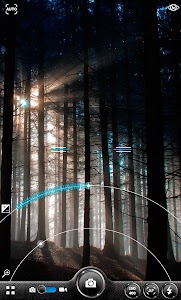
Screenshot Slider Camera PRO v1.361

"Shoot professional and stunning looking photos using easy-to-use slider control. Also contains a full-blown image editor with lot of effects and adjustment possibilities. NOW ALSO A VIDEO MODE INCLUDED! "This is packed full of features and as they’re all so easy to use Slider Camera is one of the better camera replacements I"ve spent time with." -- Tom Dawson Managing Editor Android Headlines "A solid camera replacement there’s more than meets the eye with Slider Camera and it’s one of the more impressive replacements and photo-editing apps that I"ve spent time with. Not only is this one of the fastest camera apps I"ve used on Android it’s also the easiest to use. " -- Tom Dawson Managing Editor Android Headlines Do you often see that your images are too colorless and could need tiny adjustments of colors and levels especially when shot in low-light conditions? Slider Camera is an app to solve this problem! You can tune the image immediately after it’s shot with easy-to-use sliders. No need to open photos in external image editor anymore. You only need a thumb. Good replacement camera for example for LG G3. Inspired by camera app in Nokia. Watch an intro video: http://youtu.be/iIkx0gZ4hgA Sample images shot with LG G3. FEATURES: - Video Camera - Possible to open SliderCamera from lock screen (android 4.2->) - Sliders in photo mode: - zoom - exposure correction - Shoot using camera or volume buttons on phone - Double-tap-shooting - Flash modes: On Off Auto Torch - HDR (only on devices that have hardware support for HDR) - ISO-modes: auto sports ISO100-ISO6400 (all modes that your phone supports) - Focus modes: continuous auto focus tap-to-focus macro - focus-lock possible also 5 second focus-lock in continuous mode - Selfie and normal mode - Helper grid - Resolutions: Most common ones - Quick edit mode ("Quick adjust" button appears after photo is taken for a few seconds) - Sliders in photo mode: - saturation (make colors better) - levels - contrast - warmth - Cropping image - Instant sharing - Image Gallery - share images - Image Editor - Auto correct - Effects - Stickers - Crop - Sharpen - Blur - Rotate - Brightness contrast saturation color temp - Paint - Draw - Text Suggest a feature that you would like to have and I will consider adding it if several people suggest it. Tested on devices: LG G3 Samsung Galaxy 2 Samsung Galaxy 3 Samsung Galaxy 4 Samsung Galaxy 5 Samsung Galaxy Note 3 LG Nexus 4 Nexus 5 Nexus 6"

Download APK From Server 01Download APK From Server 02
Get it on Google Play
Slider Camera PRO v1.361

Slider Camera PRO v1.361

Slider Camera PRO v1.361

Paid Application Added Date: December 01 2014
Requires Android: 4.1 and upDeveloper: SilverNova
Size: 12MCategory: Photography
Version: 1.361Version history: Slider Camera PRO

Screenshot Slider Camera PRO v1.361

"Shoot professional and stunning looking photos using easy-to-use slider control. Also contains a full-blown image editor with lot of effects and adjustment possibilities. NOW ALSO A VIDEO MODE INCLUDED! "This is packed full of features and as they’re all so easy to use Slider Camera is one of the better camera replacements I"ve spent time with." -- Tom Dawson Managing Editor Android Headlines "A solid camera replacement there’s more than meets the eye with Slider Camera and it’s one of the more impressive replacements and photo-editing apps that I"ve spent time with. Not only is this one of the fastest camera apps I"ve used on Android it’s also the easiest to use. " -- Tom Dawson Managing Editor Android Headlines Do you often see that your images are too colorless and could need tiny adjustments of colors and levels especially when shot in low-light conditions? Slider Camera is an app to solve this problem! You can tune the image immediately after it’s shot with easy-to-use sliders. No need to open photos in external image editor anymore. You only need a thumb. Good replacement camera for example for LG G3. Inspired by camera app in Nokia. Watch an intro video: http://youtu.be/iIkx0gZ4hgA Sample images shot with LG G3. FEATURES: - Video Camera - Possible to open SliderCamera from lock screen (android 4.2->) - Sliders in photo mode: - zoom - exposure correction - Shoot using camera or volume buttons on phone - Double-tap-shooting - Flash modes: On Off Auto Torch - HDR (only on devices that have hardware support for HDR) - ISO-modes: auto sports ISO100-ISO6400 (all modes that your phone supports) - Focus modes: continuous auto focus tap-to-focus macro - focus-lock possible also 5 second focus-lock in continuous mode - Selfie and normal mode - Helper grid - Resolutions: Most common ones - Quick edit mode ("Quick adjust" button appears after photo is taken for a few seconds) - Sliders in photo mode: - saturation (make colors better) - levels - contrast - warmth - Cropping image - Instant sharing - Image Gallery - share images - Image Editor - Auto correct - Effects - Stickers - Crop - Sharpen - Blur - Rotate - Brightness contrast saturation color temp - Paint - Draw - Text Suggest a feature that you would like to have and I will consider adding it if several people suggest it. Tested on devices: LG G3 Samsung Galaxy 2 Samsung Galaxy 3 Samsung Galaxy 4 Samsung Galaxy 5 Samsung Galaxy Note 3 LG Nexus 4 Nexus 5 Nexus 6"

Download APK From Server 01Download APK From Server 02
Get it on Google Play
Slider Camera PRO v1.36 build 171

Slider Camera PRO v1.36 build 171

Slider Camera PRO v1.36 build 171

Paid Application Added Date: December 01 2014
Requires Android: 4.1 and upDeveloper: SilverNova
Size: 12MCategory: Photography
Version: 1.36 build 171Version history: Slider Camera PRO

Screenshot Slider Camera PRO v1.36 build 171

"Shoot professional and stunning looking photos using easy-to-use slider control. Also contains a full-blown image editor with lot of effects and adjustment possibilities. NOW ALSO A VIDEO MODE INCLUDED! "This is packed full of features and as they’re all so easy to use Slider Camera is one of the better camera replacements I"ve spent time with." -- Tom Dawson Managing Editor Android Headlines "A solid camera replacement there’s more than meets the eye with Slider Camera and it’s one of the more impressive replacements and photo-editing apps that I"ve spent time with. Not only is this one of the fastest camera apps I"ve used on Android it’s also the easiest to use. " -- Tom Dawson Managing Editor Android Headlines Do you often see that your images are too colorless and could need tiny adjustments of colors and levels especially when shot in low-light conditions? Slider Camera is an app to solve this problem! You can tune the image immediately after it’s shot with easy-to-use sliders. No need to open photos in external image editor anymore. You only need a thumb. Good replacement camera for example for LG G3. Inspired by camera app in Nokia. Watch an intro video: http://youtu.be/iIkx0gZ4hgA Sample images shot with LG G3. FEATURES: - Video Camera - Possible to open SliderCamera from lock screen (android 4.2->) - Sliders in photo mode: - zoom - exposure correction - Shoot using camera or volume buttons on phone - Double-tap-shooting - Flash modes: On Off Auto Torch - HDR (only on devices that have hardware support for HDR) - ISO-modes: auto sports ISO100-ISO6400 (all modes that your phone supports) - Focus modes: continuous auto focus tap-to-focus macro - focus-lock possible also 5 second focus-lock in continuous mode - Selfie and normal mode - Helper grid - Resolutions: Most common ones - Quick edit mode ("Quick adjust" button appears after photo is taken for a few seconds) - Sliders in photo mode: - saturation (make colors better) - levels - contrast - warmth - Cropping image - Instant sharing - Image Gallery - share images - Image Editor - Auto correct - Effects - Stickers - Crop - Sharpen - Blur - Rotate - Brightness contrast saturation color temp - Paint - Draw - Text Suggest a feature that you would like to have and I will consider adding it if several people suggest it. Tested on devices: LG G3 Samsung Galaxy 2 Samsung Galaxy 3 Samsung Galaxy 4 Samsung Galaxy 5 Samsung Galaxy Note 3 LG Nexus 4 Nexus 5 Nexus 6"

Download APK From Server 01Download APK From Server 02
Get it on Google Play
Slider Camera PRO v1.36 build 171

Slider Camera PRO v1.36 build 171

Slider Camera PRO v1.36 build 171

Paid Application Added Date: December 01 2014
Requires Android: 4.1 and upDeveloper: SilverNova
Size: 12MCategory: Photography
Version: 1.36 build 171Version history: Slider Camera PRO

Screenshot Slider Camera PRO v1.36 build 171

"Shoot professional and stunning looking photos using easy-to-use slider control. Also contains a full-blown image editor with lot of effects and adjustment possibilities. NOW ALSO A VIDEO MODE INCLUDED! "This is packed full of features and as they’re all so easy to use Slider Camera is one of the better camera replacements I"ve spent time with." -- Tom Dawson Managing Editor Android Headlines "A solid camera replacement there’s more than meets the eye with Slider Camera and it’s one of the more impressive replacements and photo-editing apps that I"ve spent time with. Not only is this one of the fastest camera apps I"ve used on Android it’s also the easiest to use. " -- Tom Dawson Managing Editor Android Headlines Do you often see that your images are too colorless and could need tiny adjustments of colors and levels especially when shot in low-light conditions? Slider Camera is an app to solve this problem! You can tune the image immediately after it’s shot with easy-to-use sliders. No need to open photos in external image editor anymore. You only need a thumb. Good replacement camera for example for LG G3. Inspired by camera app in Nokia. Watch an intro video: http://youtu.be/iIkx0gZ4hgA Sample images shot with LG G3. FEATURES: - Video Camera - Possible to open SliderCamera from lock screen (android 4.2->) - Sliders in photo mode: - zoom - exposure correction - Shoot using camera or volume buttons on phone - Double-tap-shooting - Flash modes: On Off Auto Torch - HDR (only on devices that have hardware support for HDR) - ISO-modes: auto sports ISO100-ISO6400 (all modes that your phone supports) - Focus modes: continuous auto focus tap-to-focus macro - focus-lock possible also 5 second focus-lock in continuous mode - Selfie and normal mode - Helper grid - Resolutions: Most common ones - Quick edit mode ("Quick adjust" button appears after photo is taken for a few seconds) - Sliders in photo mode: - saturation (make colors better) - levels - contrast - warmth - Cropping image - Instant sharing - Image Gallery - share images - Image Editor - Auto correct - Effects - Stickers - Crop - Sharpen - Blur - Rotate - Brightness contrast saturation color temp - Paint - Draw - Text Suggest a feature that you would like to have and I will consider adding it if several people suggest it. Tested on devices: LG G3 Samsung Galaxy 2 Samsung Galaxy 3 Samsung Galaxy 4 Samsung Galaxy 5 Samsung Galaxy Note 3 LG Nexus 4 Nexus 5 Nexus 6"

Download APK From Server 01Download APK From Server 02
Get it on Google Play
Tuesday, February 18, 2014
Slider Camera PRO v1.36 build 170

Slider Camera PRO v1.36 build 170

Slider Camera PRO v1.36 build 170

Paid Application Added Date: November 29 2014
Requires Android: 4.1 and upDeveloper: SilverNova
Size: 12MCategory: Photography
Version: 1.36 build 170Version history: Slider Camera PRO

Screenshot Slider Camera PRO v1.36 build 170

"Shoot professional and stunning looking photos using easy-to-use slider control. Also contains a full-blown image editor with lot of effects and adjustment possibilities. NOW ALSO A VIDEO MODE INCLUDED! "This is packed full of features and as they’re all so easy to use Slider Camera is one of the better camera replacements I"ve spent time with." -- Tom Dawson Managing Editor Android Headlines "A solid camera replacement there’s more than meets the eye with Slider Camera and it’s one of the more impressive replacements and photo-editing apps that I"ve spent time with. Not only is this one of the fastest camera apps I"ve used on Android it’s also the easiest to use. " -- Tom Dawson Managing Editor Android Headlines Do you often see that your images are too colorless and could need tiny adjustments of colors and levels especially when shot in low-light conditions? Slider Camera is an app to solve this problem! You can tune the image immediately after it’s shot with easy-to-use sliders. No need to open photos in external image editor anymore. You only need a thumb. Good replacement camera for example for LG G3. Inspired by camera app in Nokia. Watch an intro video: http://youtu.be/iIkx0gZ4hgA Sample images shot with LG G3. FEATURES: - Video Camera - Possible to open SliderCamera from lock screen (android 4.2->) - Sliders in photo mode: - zoom - exposure correction - Shoot using camera or volume buttons on phone - Double-tap-shooting - Flash modes: On Off Auto Torch - HDR (only on devices that have hardware support for HDR) - ISO-modes: auto sports ISO100-ISO6400 (all modes that your phone supports) - Focus modes: continuous auto focus tap-to-focus macro - focus-lock possible also 5 second focus-lock in continuous mode - Selfie and normal mode - Helper grid - Resolutions: Most common ones - Quick edit mode ("Quick adjust" button appears after photo is taken for a few seconds) - Sliders in photo mode: - saturation (make colors better) - levels - contrast - warmth - Cropping image - Instant sharing - Image Gallery - share images - Image Editor - Auto correct - Effects - Stickers - Crop - Sharpen - Blur - Rotate - Brightness contrast saturation color temp - Paint - Draw - Text Suggest a feature that you would like to have and I will consider adding it if several people suggest it. Tested on devices: LG G3 Samsung Galaxy 2 Samsung Galaxy 3 Samsung Galaxy 4 Samsung Galaxy 5 Samsung Galaxy Note 3 LG Nexus 4 Nexus 5 Nexus 6"

Download APK From Server 01Download APK From Server 02
Get it on Google Play
Monday, February 10, 2014
Slider Camera PRO v1.36 build 168

Slider Camera PRO v1.36 build 168

Slider Camera PRO v1.36 build 168

Paid Application Added Date: November 24 2014
Requires Android: 4.1 and upDeveloper: SilverNova
Size: 12MCategory: Photography
Version: 1.36 build 168Version history: Slider Camera PRO

Screenshot Slider Camera PRO v1.36 build 168

"Shoot professional and stunning looking photos using easy-to-use slider control. Also contains a full-blown image editor with lot of effects and adjustment possibilities. NOW ALSO A VIDEO MODE INCLUDED! "This is packed full of features and as they’re all so easy to use Slider Camera is one of the better camera replacements I"ve spent time with." -- Tom Dawson Managing Editor Android Headlines "A solid camera replacement there’s more than meets the eye with Slider Camera and it’s one of the more impressive replacements and photo-editing apps that I"ve spent time with. Not only is this one of the fastest camera apps I"ve used on Android it’s also the easiest to use. " -- Tom Dawson Managing Editor Android Headlines Do you often see that your images are too colorless and could need tiny adjustments of colors and levels especially when shot in low-light conditions? Slider Camera is an app to solve this problem! You can tune the image immediately after it’s shot with easy-to-use sliders. No need to open photos in external image editor anymore. You only need a thumb. Good replacement camera for example for LG G3. Inspired by camera app in Nokia. Watch an intro video: http://youtu.be/iIkx0gZ4hgA Sample images shot with LG G3. FEATURES: - Video Camera - Possible to open SliderCamera from lock screen (android 4.2->) - Sliders in photo mode: - zoom - exposure correction - Shoot using camera or volume buttons on phone - Double-tap-shooting - Flash modes: On Off Auto Torch - HDR (only on devices that have hardware support for HDR) - ISO-modes: auto sports ISO100-ISO6400 (all modes that your phone supports) - Focus modes: continuous auto focus tap-to-focus macro - focus-lock possible also 5 second focus-lock in continuous mode - Selfie and normal mode - Helper grid - Resolutions: Most common ones - Quick edit mode ("Quick adjust" button appears after photo is taken for a few seconds) - Sliders in photo mode: - saturation (make colors better) - levels - contrast - warmth - Cropping image - Instant sharing - Image Gallery - share images - Image Editor - Auto correct - Effects - Stickers - Crop - Sharpen - Blur - Rotate - Brightness contrast saturation color temp - Paint - Draw - Text Suggest a feature that you would like to have and I will consider adding it if several people suggest it. Tested on devices: LG G3 Samsung Galaxy 2 Samsung Galaxy 3 Samsung Galaxy 4 Samsung Galaxy 5 Samsung Galaxy Note 3 LG Nexus 4 Nexus 5 Nexus 6"

Download APK From Server 01Download APK From Server 02
Get it on Google Play
Tuesday, February 4, 2014
Slider Camera PRO v1.35 build 166

Slider Camera PRO v1.35 build 166

Slider Camera PRO v1.35 build 166

Paid Application Added Date: November 21 2014
Requires Android: 4.1 and upDeveloper: SilverNova
Size: 12MCategory: Photography
Version: 1.35 build 166Version history: Slider Camera PRO

Screenshot Slider Camera PRO v1.35 build 166

"Shoot professional and stunning looking photos using easy-to-use slider control. Also contains a full-blown image editor with lot of effects and adjustment possibilities. NOW ALSO A VIDEO MODE INCLUDED! "This is packed full of features and as they’re all so easy to use Slider Camera is one of the better camera replacements I"ve spent time with." -- Tom Dawson Managing Editor Android Headlines "A solid camera replacement there’s more than meets the eye with Slider Camera and it’s one of the more impressive replacements and photo-editing apps that I"ve spent time with. Not only is this one of the fastest camera apps I"ve used on Android it’s also the easiest to use. " -- Tom Dawson Managing Editor Android Headlines Do you often see that your images are too colorless and could need tiny adjustments of colors and levels especially when shot in low-light conditions? Slider Camera is an app to solve this problem! You can tune the image immediately after it’s shot with easy-to-use sliders. No need to open photos in external image editor anymore. You only need a thumb. Good replacement camera for example for LG G3. Inspired by camera app in Nokia. Watch an intro video: http://youtu.be/iIkx0gZ4hgA Sample images shot with LG G3. FEATURES: - Video Camera - Possible to open SliderCamera from lock screen (android 4.2->) - Sliders in photo mode: - zoom - exposure correction - Shoot using camera or volume buttons on phone - Double-tap-shooting - Flash modes: On Off Auto Torch - HDR (only on devices that have hardware support for HDR) - ISO-modes: auto sports ISO100-ISO6400 (all modes that your phone supports) - Focus modes: continuous auto focus tap-to-focus macro - focus-lock possible also 5 second focus-lock in continuous mode - Selfie and normal mode - Helper grid - Resolutions: Most common ones - Quick edit mode ("Quick adjust" button appears after photo is taken for a few seconds) - Sliders in photo mode: - saturation (make colors better) - levels - contrast - warmth - Cropping image - Instant sharing - Image Gallery - share images - Image Editor - Auto correct - Effects - Stickers - Crop - Sharpen - Blur - Rotate - Brightness contrast saturation color temp - Paint - Draw - Text Suggest a feature that you would like to have and I will consider adding it if several people suggest it. Tested on devices: LG G3 Samsung Galaxy 2 Samsung Galaxy 3 Samsung Galaxy 4 Samsung Galaxy 5 Samsung Galaxy Note 3 LG Nexus 4 Nexus 5 Nexus 6"

Download APK From Server 01Download APK From Server 02
Get it on Google Play
Monday, February 3, 2014
Slider Camera PRO v1.35 build 165

Slider Camera PRO v1.35 build 165

Slider Camera PRO v1.35 build 165

Paid Application Added Date: November 20 2014
Requires Android: 4.1 and upDeveloper: SilverNova
Size: 12MCategory: Photography
Version: 1.35 build 165Version history: Slider Camera PRO

Screenshot Slider Camera PRO v1.35 build 165

"Shoot professional and stunning looking photos using easy-to-use slider control. Also contains a full-blown image editor with lot of effects and adjustment possibilities. NOW ALSO A VIDEO MODE INCLUDED! "This is packed full of features and as they’re all so easy to use Slider Camera is one of the better camera replacements I"ve spent time with." -- Tom Dawson Managing Editor Android Headlines "A solid camera replacement there’s more than meets the eye with Slider Camera and it’s one of the more impressive replacements and photo-editing apps that I"ve spent time with. Not only is this one of the fastest camera apps I"ve used on Android it’s also the easiest to use. " -- Tom Dawson Managing Editor Android Headlines Do you often see that your images are too colorless and could need tiny adjustments of colors and levels especially when shot in low-light conditions? Slider Camera is an app to solve this problem! You can tune the image immediately after it’s shot with easy-to-use sliders. No need to open photos in external image editor anymore. You only need a thumb. Good replacement camera for example for LG G3. Inspired by camera app in Nokia. Watch an intro video: http://youtu.be/iIkx0gZ4hgA Sample images shot with LG G3. FEATURES: - Video Camera - Possible to open SliderCamera from lock screen (android 4.2->) - Sliders in photo mode: - zoom - exposure correction - Shoot using camera or volume buttons on phone - Double-tap-shooting - Flash modes: On Off Auto Torch - HDR (only on devices that have hardware support for HDR) - ISO-modes: auto sports ISO100-ISO6400 (all modes that your phone supports) - Focus modes: continuous auto focus tap-to-focus macro - focus-lock possible also 5 second focus-lock in continuous mode - Selfie and normal mode - Helper grid - Resolutions: Most common ones - Quick edit mode ("Quick adjust" button appears after photo is taken for a few seconds) - Sliders in photo mode: - saturation (make colors better) - levels - contrast - warmth - Cropping image - Instant sharing - Image Gallery - share images - Image Editor - Auto correct - Effects - Stickers - Crop - Sharpen - Blur - Rotate - Brightness contrast saturation color temp - Paint - Draw - Text Suggest a feature that you would like to have and I will consider adding it if several people suggest it. Tested on devices: LG G3 Samsung Galaxy 2 Samsung Galaxy 3 Samsung Galaxy 4 Samsung Galaxy 5 Samsung Galaxy Note 3 LG Nexus 4 Nexus 5 Nexus 6"

Download APK From Server 01Download APK From Server 02
Get it on Google Play
Wednesday, January 29, 2014
Slider Camera PRO v1.35

Slider Camera PRO v1.35

Slider Camera PRO v1.35

Paid Application Added Date: November 16 2014
Requires Android: 4.1 and upDeveloper: SilverNova
Size: 12MCategory: Photography
Version: 1.35Version history: Slider Camera PRO

Screenshot Slider Camera PRO v1.35

"Shoot professional and stunning looking photos using easy-to-use slider control. Also contains a full-blown image editor with lot of effects and adjustment possibilities. NOW ALSO A VIDEO MODE INCLUDED! "This is packed full of features and as they’re all so easy to use Slider Camera is one of the better camera replacements I"ve spent time with." -- Tom Dawson Managing Editor Android Headlines "A solid camera replacement there’s more than meets the eye with Slider Camera and it’s one of the more impressive replacements and photo-editing apps that I"ve spent time with. Not only is this one of the fastest camera apps I"ve used on Android it’s also the easiest to use. " -- Tom Dawson Managing Editor Android Headlines Do you often see that your images are too colorless and could need tiny adjustments of colors and levels especially when shot in low-light conditions? Slider Camera is an app to solve this problem! You can tune the image immediately after it’s shot with easy-to-use sliders. No need to open photos in external image editor anymore. You only need a thumb. Good replacement camera for example for LG G3. Inspired by camera app in Nokia. Watch an intro video: http://youtu.be/iIkx0gZ4hgA Sample images shot with LG G3. FEATURES: - Video Camera - Possible to open SliderCamera from lock screen (android 4.2->) - Sliders in photo mode: - zoom - exposure correction - Shoot using camera or volume buttons on phone - Double-tap-shooting - Flash modes: On Off Auto Torch - HDR (only on devices that have hardware support for HDR) - ISO-modes: auto sports ISO100-ISO6400 (all modes that your phone supports) - Focus modes: continuous auto focus tap-to-focus macro - focus-lock possible also 5 second focus-lock in continuous mode - Selfie and normal mode - Helper grid - Resolutions: Most common ones - Quick edit mode ("Quick adjust" button appears after photo is taken for a few seconds) - Sliders in photo mode: - saturation (make colors better) - levels - contrast - warmth - Cropping image - Instant sharing - Image Gallery - share images - Image Editor - Auto correct - Effects - Stickers - Crop - Sharpen - Blur - Rotate - Brightness contrast saturation color temp - Paint - Draw - Text Suggest a feature that you would like to have and I will consider adding it if several people suggest it. Tested on devices: LG G3 Samsung Galaxy 2 Samsung Galaxy 3 Samsung Galaxy 4 Samsung Galaxy 5 Samsung Galaxy Note 3 LG Nexus 4 Nexus 5 Nexus 6"

Download APK From Server 01Download APK From Server 02
Get it on Google Play
Copyright © 2012 Android Stock APK All Right Reserved
Designed by CBTblogger