Breaking News
Loading...
  • New Movies
  • Recent Games
  • Tech Review

Tab 1 Top Area

Tech News

Game Reviews

Recent Post

Showing posts with label astoncheah. Show all posts
Tuesday, January 6, 2015
Monday, December 15, 2014
Monday, November 3, 2014
Tuesday, September 30, 2014
Tuesday, September 16, 2014
Friday, September 12, 2014
Saturday, September 6, 2014
Thursday, July 17, 2014
Wednesday, July 16, 2014
Friday, June 27, 2014
Wednesday, June 18, 2014
Tuesday, June 3, 2014
Wednesday, May 21, 2014
Sunday, May 11, 2014
Monday, April 28, 2014
Friday, April 4, 2014
Monday, February 17, 2014
C Locker Pro v6.3.8

C Locker Pro v6.3.8

C Locker Pro v6.3.8

Paid Application Added Date: November 29 2014
Requires Android: 4.1 and upDeveloper: astoncheah
Size: 4.4MCategory: Personalization
Version: 6.3.8Version history: C Locker Pro

Screenshot C Locker Pro v6.3.8

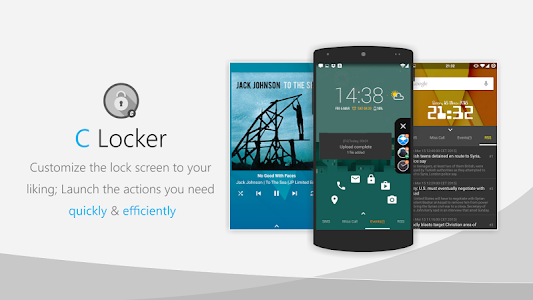
">>>Customize the Widgets you like Launch the Actions you need…quickly! Latest Update: ~~C Locker now supports Samsung Galaxy S Series Fingerprint Unlock!! Note: ~~Please try the FREE VERSION before buying some of the features may not be compatible to your device. =====Extra Features for Pro version: ===== 1. Things you can see from the Lock Screen: ---All app Widgets or 5 types of default widgets ---Notifications from facebook gooble+ whatsapp..basically all supported.. ---RSS Feeds (CNN BBC) Network Provider Name Battery info.. ---Calendar Events List Reminder.. 2. Things you can customize on the Lock Screen ---Adding Multiple app Widgets for 3 Profiles: default music location ---Volume Rocker Control long press to play/skip (next/prev) music. ---Locker screen sliding gesture actions with 4 directions (Up Down Left Right) X 2 fingers ---Double/Triple Tap to turn off screen and other shortcut actions ---More than 30 custom shortcuts your can set to launch apps direct call direct sms ---RSS update interval and other settings ---Security PIN for shortcuts and unlock =====Features for Free version: ===== 1. Things you can see from the Lock Screen: ---3 Profiles: default music location ---5 types of default widgets: Time Date Day Next Alarm ---App Widget ---Missed calls New SMS Gmail notices ---Notifications from facebook google+ whatsapp..basically all supported..(Maximum 2 notification apps can be selected for [Free Version]) 2. Things you can customize on the Lock Screen ---Preset your own location profile ---Security PIN for shortcuts and unlock (one PIN can be set for Free version) ---Adding one app Widget ---Block statusbar hide statusbar clock and icons disable statusbar alerts hide navigation bar (Root access required) ---Full Screen (hide the status bar...) ---Lock screen Wallpaper/Live Wallpaper ---To show/hide missed calls contact new sms contents ---Own custom icon selection ---Screen timeout ---Unlock sound screen off sound ---Disabling Default Home Button function Long press Home Button to launch recent apps ---Weather update interval and other settings ---And many other customizations =====Android Permissions Information===== https://www.dropbox.com/s/aavmz9c7rv8nlhj/C%20Locker%20Permissions.pdf"

Download APK From Server 01Download APK From Server 02
Get it on Google Play
Monday, February 3, 2014
C Locker Pro v5.0.0.07

C Locker Pro v5.0.0.07

C Locker Pro v5.0.0.07

Paid Application Added Date: March 17 2014
Requires Android: 4.1 and upDeveloper: astoncheah
Size: 4.4MCategory: Personalization
Version: 5.0.0.07Version history: C Locker Pro

Screenshot C Locker Pro v5.0.0.07

">>>Customize the Widgets you like Launch the Actions you need…quickly! Latest Update: ~~C Locker now supports Samsung Galaxy S Series Fingerprint Unlock!! Note: ~~Please try the FREE VERSION before buying some of the features may not be compatible to your device. =====Extra Features for Pro version: ===== 1. Things you can see from the Lock Screen: ---All app Widgets or 5 types of default widgets ---Notifications from facebook gooble+ whatsapp..basically all supported.. ---RSS Feeds (CNN BBC) Network Provider Name Battery info.. ---Calendar Events List Reminder.. 2. Things you can customize on the Lock Screen ---Adding Multiple app Widgets for 3 Profiles: default music location ---Volume Rocker Control long press to play/skip (next/prev) music. ---Locker screen sliding gesture actions with 4 directions (Up Down Left Right) X 2 fingers ---Double/Triple Tap to turn off screen and other shortcut actions ---More than 30 custom shortcuts your can set to launch apps direct call direct sms ---RSS update interval and other settings ---Security PIN for shortcuts and unlock =====Features for Free version: ===== 1. Things you can see from the Lock Screen: ---3 Profiles: default music location ---5 types of default widgets: Time Date Day Next Alarm ---App Widget ---Missed calls New SMS Gmail notices ---Notifications from facebook google+ whatsapp..basically all supported..(Maximum 2 notification apps can be selected for [Free Version]) 2. Things you can customize on the Lock Screen ---Preset your own location profile ---Security PIN for shortcuts and unlock (one PIN can be set for Free version) ---Adding one app Widget ---Block statusbar hide statusbar clock and icons disable statusbar alerts hide navigation bar (Root access required) ---Full Screen (hide the status bar...) ---Lock screen Wallpaper/Live Wallpaper ---To show/hide missed calls contact new sms contents ---Own custom icon selection ---Screen timeout ---Unlock sound screen off sound ---Disabling Default Home Button function Long press Home Button to launch recent apps ---Weather update interval and other settings ---And many other customizations =====Android Permissions Information===== https://www.dropbox.com/s/aavmz9c7rv8nlhj/C%20Locker%20Permissions.pdf"

Download APK From Server 01Download APK From Server 02
Get it on Google Play
Friday, November 29, 2013
C Locker Pro v6.3.6

C Locker Pro v6.3.6

C Locker Pro v6.3.6

Paid Application Added Date: September 27 2014
Requires Android: 4.1 and upDeveloper: astoncheah
Size: 4.4MCategory: Personalization
Version: 6.3.6Version history: C Locker Pro

Screenshot C Locker Pro v6.3.6

">>>Customize the Widgets you like Launch the Actions you need…quickly! Latest Update: ~~C Locker now supports Samsung Galaxy S Series Fingerprint Unlock!! Note: ~~Please try the FREE VERSION before buying some of the features may not be compatible to your device. =====Extra Features for Pro version: ===== 1. Things you can see from the Lock Screen: ---All app Widgets or 5 types of default widgets ---Notifications from facebook gooble+ whatsapp..basically all supported.. ---RSS Feeds (CNN BBC) Network Provider Name Battery info.. ---Calendar Events List Reminder.. 2. Things you can customize on the Lock Screen ---Adding Multiple app Widgets for 3 Profiles: default music location ---Volume Rocker Control long press to play/skip (next/prev) music. ---Locker screen sliding gesture actions with 4 directions (Up Down Left Right) X 2 fingers ---Double/Triple Tap to turn off screen and other shortcut actions ---More than 30 custom shortcuts your can set to launch apps direct call direct sms ---RSS update interval and other settings ---Security PIN for shortcuts and unlock =====Features for Free version: ===== 1. Things you can see from the Lock Screen: ---3 Profiles: default music location ---5 types of default widgets: Time Date Day Next Alarm ---App Widget ---Missed calls New SMS Gmail notices ---Notifications from facebook google+ whatsapp..basically all supported..(Maximum 2 notification apps can be selected for [Free Version]) 2. Things you can customize on the Lock Screen ---Preset your own location profile ---Security PIN for shortcuts and unlock (one PIN can be set for Free version) ---Adding one app Widget ---Block statusbar hide statusbar clock and icons disable statusbar alerts hide navigation bar (Root access required) ---Full Screen (hide the status bar...) ---Lock screen Wallpaper/Live Wallpaper ---To show/hide missed calls contact new sms contents ---Own custom icon selection ---Screen timeout ---Unlock sound screen off sound ---Disabling Default Home Button function Long press Home Button to launch recent apps ---Weather update interval and other settings ---And many other customizations =====Android Permissions Information===== https://www.dropbox.com/s/aavmz9c7rv8nlhj/C%20Locker%20Permissions.pdf"

Download APK From Server 01Download APK From Server 02
Get it on Google Play
Thursday, November 14, 2013
C Locker Pro v6.3.1

C Locker Pro v6.3.1

C Locker Pro v6.3.1

Paid Application Added Date: September 18 2014
Requires Android: 4.1 and upDeveloper: astoncheah
Size: 4.4MCategory: Personalization
Version: 6.3.1Version history: C Locker Pro

Screenshot C Locker Pro v6.3.1

">>>Customize the Widgets you like Launch the Actions you need…quickly! Latest Update: ~~C Locker now supports Samsung Galaxy S Series Fingerprint Unlock!! Note: ~~Please try the FREE VERSION before buying some of the features may not be compatible to your device. =====Extra Features for Pro version: ===== 1. Things you can see from the Lock Screen: ---All app Widgets or 5 types of default widgets ---Notifications from facebook gooble+ whatsapp..basically all supported.. ---RSS Feeds (CNN BBC) Network Provider Name Battery info.. ---Calendar Events List Reminder.. 2. Things you can customize on the Lock Screen ---Adding Multiple app Widgets for 3 Profiles: default music location ---Volume Rocker Control long press to play/skip (next/prev) music. ---Locker screen sliding gesture actions with 4 directions (Up Down Left Right) X 2 fingers ---Double/Triple Tap to turn off screen and other shortcut actions ---More than 30 custom shortcuts your can set to launch apps direct call direct sms ---RSS update interval and other settings ---Security PIN for shortcuts and unlock =====Features for Free version: ===== 1. Things you can see from the Lock Screen: ---3 Profiles: default music location ---5 types of default widgets: Time Date Day Next Alarm ---App Widget ---Missed calls New SMS Gmail notices ---Notifications from facebook google+ whatsapp..basically all supported..(Maximum 2 notification apps can be selected for [Free Version]) 2. Things you can customize on the Lock Screen ---Preset your own location profile ---Security PIN for shortcuts and unlock (one PIN can be set for Free version) ---Adding one app Widget ---Block statusbar hide statusbar clock and icons disable statusbar alerts hide navigation bar (Root access required) ---Full Screen (hide the status bar...) ---Lock screen Wallpaper/Live Wallpaper ---To show/hide missed calls contact new sms contents ---Own custom icon selection ---Screen timeout ---Unlock sound screen off sound ---Disabling Default Home Button function Long press Home Button to launch recent apps ---Weather update interval and other settings ---And many other customizations =====Android Permissions Information===== https://www.dropbox.com/s/aavmz9c7rv8nlhj/C%20Locker%20Permissions.pdf"

Download APK From Server 01Download APK From Server 02
Get it on Google Play
Copyright © 2012 Android Stock APK All Right Reserved
Designed by CBTblogger